The code at this page can be downloaded here
Before starting, please ensure you have installed the TriplotGUI package following the Setup instructions.
Data description
The data used in this tutorial can be downloaded here in rda format.
This example utilizes CAMP_2, which is a modified version of the CAMP data provided by the Triplot package (Schillemans et al. 2019). The CAMP dataset was simulated from authentic data collected in a cross-sectional study of carbohydrate alternatives and metabolic phenotypes among young adults in China (Liu et al. 2018). The simulated CAMP_2 data consists of three data frames:
- Clinical measurements (ClinData): Contains 14 variables, including
"AGE","SEX","BMI","triglycerides","total_cholesterol""HDL"(high-density lipoprotein cholesterol),"LDL"(low-density lipoprotein cholesterol),,"GGT"(gamma-glutamyltransferase),"ALT"(alanine aminotransferase),"AST"(aspartate aminotransferase),"creatinine","Urea_nitrogen","Uric_acid","Fasting_glucose". - Plasma metabolites predictive of BMI (MetaboliteData): Comprises 20 variables
- Dietary intake as measured by food frequency questionnaires (FoodData): Includes 11 variables:
"Refined_grains","Coarse_grains","Red_meat","Poutry","Seafood","Egg","Animal_organs","Vegetables","Fruits","Potatos","Legumes".
The data frames are row-wise matched by observations and consist of 300 synthetic observations.
Reference
Liu X, Liao X, Gan W, et al. Inverse Relationship between Coarse Food Grain Intake and Blood Pressure among Young Chinese Adults. Am J Hypertens. 2019;32(4):402–408. 10.1093/ajh/hpy187
Schillemans T, Shi L, Liu X, Åkesson A, Landberg R, Brunius C. Visualization and Interpretation of Multivariate Associations with Disease Risk Markers and Disease Risk-The Triplot. Metabolites. 2019 Jul 6;9(7):133. doi: 10.3390/metabo9070133
Research question
We aim to assess the relationship between diet, metabolic profiles, and risk factors for metabolic diseases, including BMI, total cholesterol, triglycerides, HDL, and LDL. In this context, we assume that metabolites act as mediators, facilitating the effect of dietary exposures on these risk factors.
Data exploration
CAMP_2 is loaded in the R environment upon running library(TriplotGUI). Let’s begin with some data exploration to understand the structure and contents of the dataset:
Check CAMP_2
Check the CAMP_2 list:
Check datasets
Check the names of variables in each data:
Show the code
colnames(CAMP_2$ClinData) [1] "AGE" "SEX" "BMI"
[4] "triglycerides" "total_cholesterol" "HDL"
[7] "LDL" "GGT" "ALT"
[10] "AST" "creatinine" "Urea_nitrogen"
[13] "Uric_acid" "Fasting_glucose" Show the code
colnames(CAMP_2$MetaboliteData) [1] "PC_P_20_0_22_6_"
[2] "X1__3_4_Dihydroxyphenyl__7__4_hydroxy_3_methoxyphenyl__1_6_heptadiene_3_5_dione"
[3] "Unknown_675.6485_9.35"
[4] "Unknown_1066.9034_10.16"
[5] "PC_42_8_"
[6] "Unknown_931.7610_9.68"
[7] "TG_52_0_"
[8] "CE_22_4_"
[9] "Neutral_glycosphingolipids1023.67"
[10] "TG_58_10_"
[11] "Neutral_glycosphingolipids971.72"
[12] "Unknown_914.7433_10.06"
[13] "Cucurbic_acid"
[14] "DG_16_0_18_2_"
[15] "Indoleacrylic_acid"
[16] "PC_O_20_0_22_6_"
[17] "Unknown_948.6589_8.51"
[18] "Unknown_858.5318_5.49"
[19] "O_propanoyl_carnitine"
[20] "DG_38_5_" Show the code
colnames(CAMP_2$FoodData) [1] "Refined_grains" "Coarse_grains" "Red_meat" "Poutry"
[5] "Seafood" "Egg" "Animal_organs" "Vegetables"
[9] "Fruits" "Potatos" "Legumes" Check variables’ class
We then transform the data to dataframe format and use TriplotGUI’s checkdata() function to examine the classes of variables.
Show the code
ClinData<-as.data.frame(CAMP_2$ClinData)
MetaboliteData<-as.data.frame(CAMP_2$MetaboliteData)
FoodData<-as.data.frame(CAMP_2$FoodData)

ClinData_check<-checkdata(ClinData)
MetaboliteData_check<-checkdata(MetaboliteData)
FoodData_check<-checkdata(FoodData)
Show the code
ClinData_check$class_summary_statistics$check_class_vector
AGE SEX BMI triglycerides
"numeric" "factor" "numeric" "numeric"
total_cholesterol HDL LDL GGT
"numeric" "numeric" "numeric" "numeric"
ALT AST creatinine Urea_nitrogen
"numeric" "numeric" "numeric" "numeric"
Uric_acid Fasting_glucose
"numeric" "numeric"
$check_class_table
check_class_vector
factor numeric
1 13 Show the code
MetaboliteData_check$class_summary_statistics$check_class_vector
PC_P_20_0_22_6_
"numeric"
X1__3_4_Dihydroxyphenyl__7__4_hydroxy_3_methoxyphenyl__1_6_heptadiene_3_5_dione
"numeric"
Unknown_675.6485_9.35
"numeric"
Unknown_1066.9034_10.16
"numeric"
PC_42_8_
"numeric"
Unknown_931.7610_9.68
"numeric"
TG_52_0_
"numeric"
CE_22_4_
"numeric"
Neutral_glycosphingolipids1023.67
"numeric"
TG_58_10_
"numeric"
Neutral_glycosphingolipids971.72
"numeric"
Unknown_914.7433_10.06
"numeric"
Cucurbic_acid
"numeric"
DG_16_0_18_2_
"numeric"
Indoleacrylic_acid
"numeric"
PC_O_20_0_22_6_
"numeric"
Unknown_948.6589_8.51
"numeric"
Unknown_858.5318_5.49
"numeric"
O_propanoyl_carnitine
"numeric"
DG_38_5_
"numeric"
$check_class_table
check_class_vector
numeric
20 Show the code
FoodData_check$class_summary_statistics$check_class_vector
Refined_grains Coarse_grains Red_meat Poutry Seafood
"numeric" "numeric" "numeric" "numeric" "numeric"
Egg Animal_organs Vegetables Fruits Potatos
"numeric" "numeric" "numeric" "numeric" "numeric"
Legumes
"numeric"
$check_class_table
check_class_vector
numeric
11 Check sanities for variables
To check for missing (NA) or abnormal values (e.g., NaN, negative values, infinite values, blank values) in each variable, you can use the checkdata() function. This function generates a summary table for each data frame, showing the number of observations containing NA, NaN, zero, negative, infinite (Inf), and blank values, along with their percentages.
Show the code
if (!require(kableExtra)) {
  install.packages("kableExtra")  # Install the package if it's not available.

}
library(kableExtra)             # Load it after installation.'
Show the code
kable(ClinData_check$everycolumn)| AGE | SEX | BMI | triglycerides | total_cholesterol | HDL | LDL | GGT | ALT | AST | creatinine | Urea_nitrogen | Uric_acid | Fasting_glucose | |
|---|---|---|---|---|---|---|---|---|---|---|---|---|---|---|
| NA_number | 0 | 0 | 0 | 0.0000000 | 0 | 0 | 0 | 0.0000000 | 0.0000000 | 0 | 0 | 0 | 0 | 0 |
| NA_percentage | 0 | 0 | 0 | 0.0000000 | 0 | 0 | 0 | 0.0000000 | 0.0000000 | 0 | 0 | 0 | 0 | 0 |
| NaN_number | 0 | 0 | 0 | 0.0000000 | 0 | 0 | 0 | 0.0000000 | 0.0000000 | 0 | 0 | 0 | 0 | 0 |
| NaN_percentage | 0 | 0 | 0 | 0.0000000 | 0 | 0 | 0 | 0.0000000 | 0.0000000 | 0 | 0 | 0 | 0 | 0 |
| negative_number | 0 | 0 | 0 | 0.0000000 | 0 | 0 | 0 | 0.0000000 | 0.0000000 | 0 | 0 | 0 | 0 | 0 |
| negative_percentage | 0 | 0 | 0 | 0.0000000 | 0 | 0 | 0 | 0.0000000 | 0.0000000 | 0 | 0 | 0 | 0 | 0 |
| zero_number | 0 | 0 | 0 | 4.0000000 | 0 | 0 | 0 | 14.0000000 | 65.0000000 | 0 | 0 | 0 | 0 | 0 |
| zero_percentage | 0 | 0 | 0 | 0.0133333 | 0 | 0 | 0 | 0.0466667 | 0.2166667 | 0 | 0 | 0 | 0 | 0 |
| inf_number | 0 | 0 | 0 | 0.0000000 | 0 | 0 | 0 | 0.0000000 | 0.0000000 | 0 | 0 | 0 | 0 | 0 |
| inf_percentage | 0 | 0 | 0 | 0.0000000 | 0 | 0 | 0 | 0.0000000 | 0.0000000 | 0 | 0 | 0 | 0 | 0 |
| blank_number | 0 | 0 | 0 | 0.0000000 | 0 | 0 | 0 | 0.0000000 | 0.0000000 | 0 | 0 | 0 | 0 | 0 |
| blank_percentage | 0 | 0 | 0 | 0.0000000 | 0 | 0 | 0 | 0.0000000 | 0.0000000 | 0 | 0 | 0 | 0 | 0 |
Show the code
kable(MetaboliteData_check$everycolumn)| PC_P_20_0_22_6_ | X1__3_4_Dihydroxyphenyl__7__4_hydroxy_3_methoxyphenyl__1_6_heptadiene_3_5_dione | Unknown_675.6485_9.35 | Unknown_1066.9034_10.16 | PC_42_8_ | Unknown_931.7610_9.68 | TG_52_0_ | CE_22_4_ | Neutral_glycosphingolipids1023.67 | TG_58_10_ | Neutral_glycosphingolipids971.72 | Unknown_914.7433_10.06 | Cucurbic_acid | DG_16_0_18_2_ | Indoleacrylic_acid | PC_O_20_0_22_6_ | Unknown_948.6589_8.51 | Unknown_858.5318_5.49 | O_propanoyl_carnitine | DG_38_5_ | |
|---|---|---|---|---|---|---|---|---|---|---|---|---|---|---|---|---|---|---|---|---|
| NA_number | 0 | 0 | 0 | 0 | 0 | 0.0000000 | 0 | 0.0000000 | 0 | 0.0000000 | 0 | 0 | 0 | 0.0000000 | 0 | 0 | 0 | 0 | 0 | 0 |
| NA_percentage | 0 | 0 | 0 | 0 | 0 | 0.0000000 | 0 | 0.0000000 | 0 | 0.0000000 | 0 | 0 | 0 | 0.0000000 | 0 | 0 | 0 | 0 | 0 | 0 |
| NaN_number | 0 | 0 | 0 | 0 | 0 | 0.0000000 | 0 | 0.0000000 | 0 | 0.0000000 | 0 | 0 | 0 | 0.0000000 | 0 | 0 | 0 | 0 | 0 | 0 |
| NaN_percentage | 0 | 0 | 0 | 0 | 0 | 0.0000000 | 0 | 0.0000000 | 0 | 0.0000000 | 0 | 0 | 0 | 0.0000000 | 0 | 0 | 0 | 0 | 0 | 0 |
| negative_number | 0 | 0 | 0 | 0 | 0 | 0.0000000 | 0 | 0.0000000 | 0 | 0.0000000 | 0 | 0 | 0 | 0.0000000 | 0 | 0 | 0 | 0 | 0 | 0 |
| negative_percentage | 0 | 0 | 0 | 0 | 0 | 0.0000000 | 0 | 0.0000000 | 0 | 0.0000000 | 0 | 0 | 0 | 0.0000000 | 0 | 0 | 0 | 0 | 0 | 0 |
| zero_number | 0 | 0 | 0 | 0 | 0 | 7.0000000 | 0 | 16.0000000 | 0 | 8.0000000 | 0 | 0 | 0 | 1.0000000 | 0 | 0 | 0 | 0 | 0 | 0 |
| zero_percentage | 0 | 0 | 0 | 0 | 0 | 0.0233333 | 0 | 0.0533333 | 0 | 0.0266667 | 0 | 0 | 0 | 0.0033333 | 0 | 0 | 0 | 0 | 0 | 0 |
| inf_number | 0 | 0 | 0 | 0 | 0 | 0.0000000 | 0 | 0.0000000 | 0 | 0.0000000 | 0 | 0 | 0 | 0.0000000 | 0 | 0 | 0 | 0 | 0 | 0 |
| inf_percentage | 0 | 0 | 0 | 0 | 0 | 0.0000000 | 0 | 0.0000000 | 0 | 0.0000000 | 0 | 0 | 0 | 0.0000000 | 0 | 0 | 0 | 0 | 0 | 0 |
| blank_number | 0 | 0 | 0 | 0 | 0 | 0.0000000 | 0 | 0.0000000 | 0 | 0.0000000 | 0 | 0 | 0 | 0.0000000 | 0 | 0 | 0 | 0 | 0 | 0 |
| blank_percentage | 0 | 0 | 0 | 0 | 0 | 0.0000000 | 0 | 0.0000000 | 0 | 0.0000000 | 0 | 0 | 0 | 0.0000000 | 0 | 0 | 0 | 0 | 0 | 0 |
Show the code
kable(FoodData_check$everycolumn)| Refined_grains | Coarse_grains | Red_meat | Poutry | Seafood | Egg | Animal_organs | Vegetables | Fruits | Potatos | Legumes | |
|---|---|---|---|---|---|---|---|---|---|---|---|
| NA_number | 0.0000000 | 0.0000000 | 0.0000000 | 0.0000000 | 0.0000000 | 0.0000000 | 0.0000000 | 0.00 | 0.0000000 | 0.0000000 | 0.0000000 |
| NA_percentage | 0.0000000 | 0.0000000 | 0.0000000 | 0.0000000 | 0.0000000 | 0.0000000 | 0.0000000 | 0.00 | 0.0000000 | 0.0000000 | 0.0000000 |
| NaN_number | 0.0000000 | 0.0000000 | 0.0000000 | 0.0000000 | 0.0000000 | 0.0000000 | 0.0000000 | 0.00 | 0.0000000 | 0.0000000 | 0.0000000 |
| NaN_percentage | 0.0000000 | 0.0000000 | 0.0000000 | 0.0000000 | 0.0000000 | 0.0000000 | 0.0000000 | 0.00 | 0.0000000 | 0.0000000 | 0.0000000 |
| negative_number | 0.0000000 | 0.0000000 | 0.0000000 | 0.0000000 | 0.0000000 | 0.0000000 | 0.0000000 | 0.00 | 0.0000000 | 0.0000000 | 0.0000000 |
| negative_percentage | 0.0000000 | 0.0000000 | 0.0000000 | 0.0000000 | 0.0000000 | 0.0000000 | 0.0000000 | 0.00 | 0.0000000 | 0.0000000 | 0.0000000 |
| zero_number | 65.0000000 | 110.0000000 | 101.0000000 | 85.0000000 | 103.0000000 | 100.0000000 | 116.0000000 | 57.00 | 56.0000000 | 67.0000000 | 79.0000000 |
| zero_percentage | 0.2166667 | 0.3666667 | 0.3366667 | 0.2833333 | 0.3433333 | 0.3333333 | 0.3866667 | 0.19 | 0.1866667 | 0.2233333 | 0.2633333 |
| inf_number | 0.0000000 | 0.0000000 | 0.0000000 | 0.0000000 | 0.0000000 | 0.0000000 | 0.0000000 | 0.00 | 0.0000000 | 0.0000000 | 0.0000000 |
| inf_percentage | 0.0000000 | 0.0000000 | 0.0000000 | 0.0000000 | 0.0000000 | 0.0000000 | 0.0000000 | 0.00 | 0.0000000 | 0.0000000 | 0.0000000 |
| blank_number | 0.0000000 | 0.0000000 | 0.0000000 | 0.0000000 | 0.0000000 | 0.0000000 | 0.0000000 | 0.00 | 0.0000000 | 0.0000000 | 0.0000000 |
| blank_percentage | 0.0000000 | 0.0000000 | 0.0000000 | 0.0000000 | 0.0000000 | 0.0000000 | 0.0000000 | 0.00 | 0.0000000 | 0.0000000 | 0.0000000 |
You shall only continue to use the data when the class of variables are correct and the missing or abnormal values in the variable are properly handled.
Build data for analysis
We treat food variables as our exposures and BMI, triglycerides, total_cholesterol, HDL and LDL as outcomes. We want to explore their relationships through the metabolomics data, using metabolites as assumed mediators. Sex and age are used as potential confounders for exposure-mediator and mediator-outcome association.
Code example of using TriplotGUI
We will use the most simple settings in this example. Please go to Tutorial(complex), if you want to try more advanced settings.
Step 1: Data reduction of Omics variables
Using TriplotGUI package, first we perform dimension reduction, i.e. principal component analysis (PCA) on metabolomics variables.
Show the code
reduced_Omics1 <- OmicsReduction(dataframe = Omics1,
                                   pcNum = 5,
                                   option = "PCA",
                                   loadingsName = TRUE)
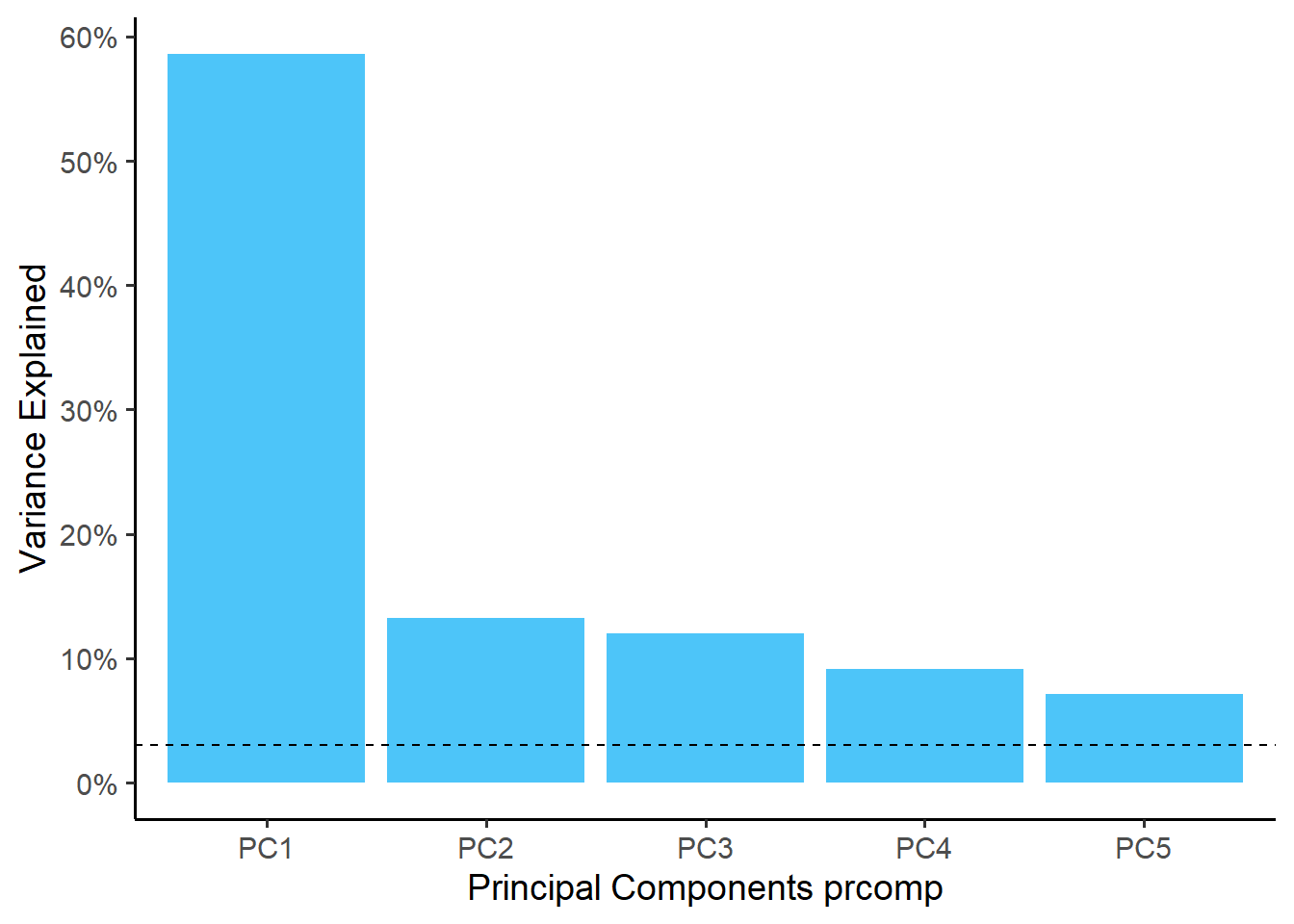
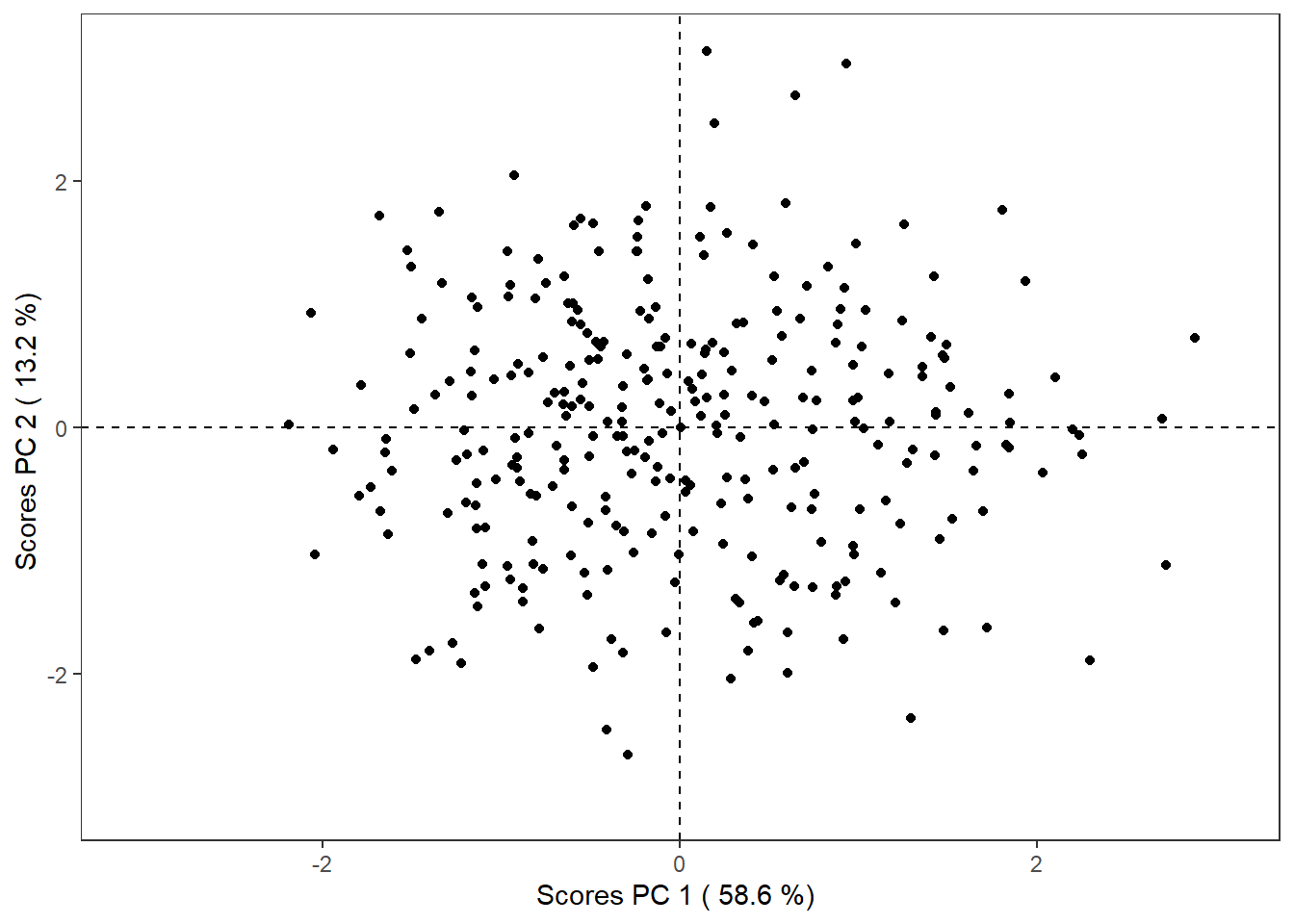
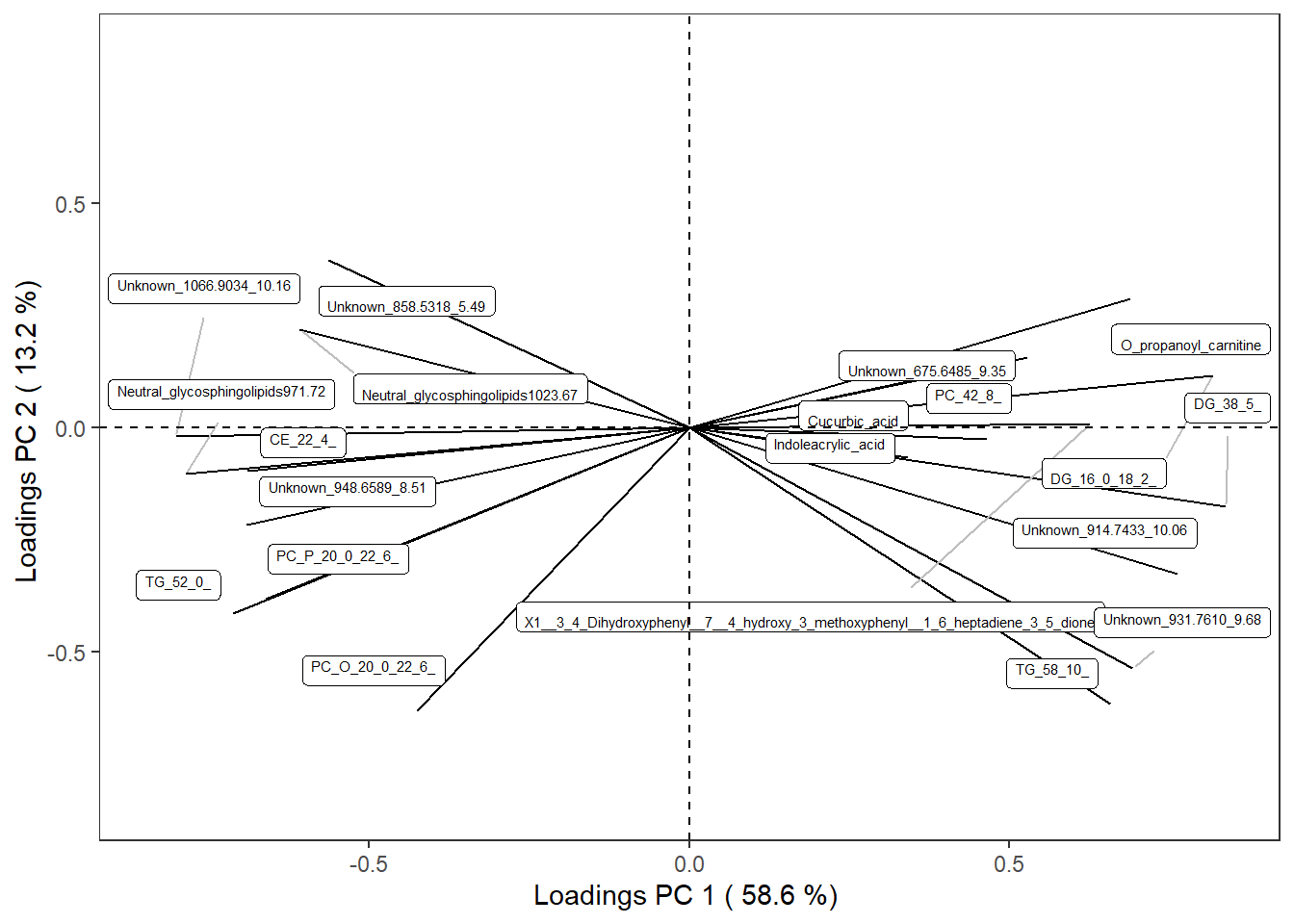
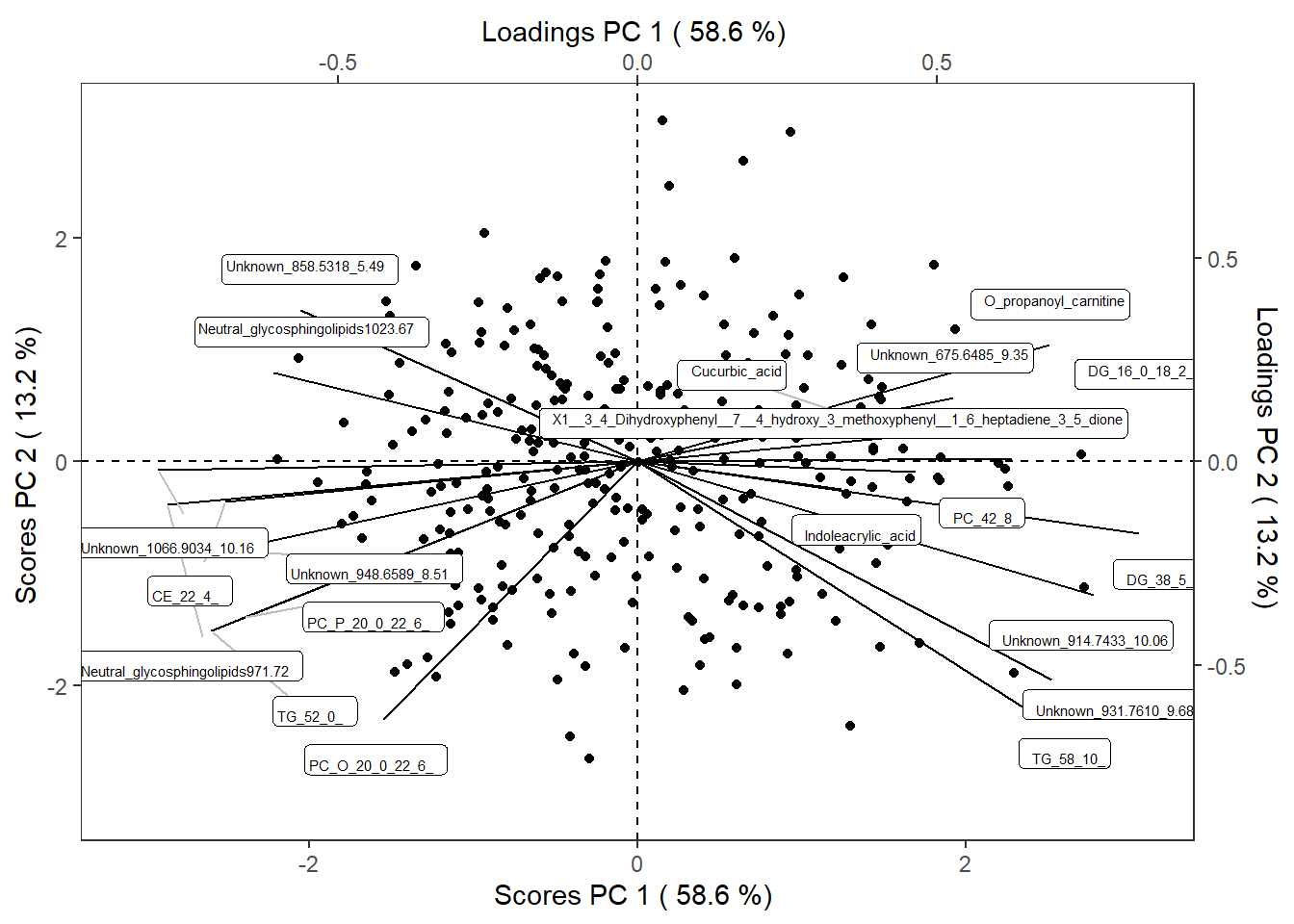
You can view scree plot, score plot, loading plot and biplot at this stage.
Show the code
reduced_Omics1$scree_plotplot
Show the code
reduced_Omics1$score_plotplot
Show the code
reduced_Omics1$loading_plotplot
Show the code
reduced_Omics1$scoreloading_plotplot
Sometimes the following text will show up in your console and the figure cannot be directly run:
libpng warning: Image width is zero in IHDR
libpng error: Invalid IHDR data
Warning message:
In dev.off(which) : agg could not write to the given file\
Run gc() in your console to clear the memory. Then rerun the code again to view the figure.
We then build a TPObject based on the data reduction results. This object will be used to save information and facilitate the transfer of data through the various steps in TriplotGUI.
Show the code
scores <- reduced_Omics1$object$scores
loadings <- reduced_Omics1$object$loadings
variance <- reduced_Omics1$object$variance
TPObject1 <- makeTPO(scores = scores,
                     loadings = loadings,
                     variance = variance)
Making TriPlotObject (TPO)
--------------------------
Loading matrix has 20 variables and 20 components.

Score matrix has 300 observations and 20 components.

TPO has 0 attached correlations.
TPO has 0 attached risks.
Step 2-3: Exposures-Omics and Omics-Outcomes associations
The associations between principal components (PCs) and food items are calculated using Pearson correlations, adjusting for confounders. We investigate associations between PC scores and risk markers adjusting for confounders using linear regression, as all food variables are numeric.
The PC scores are saved in the TPObject, which can be directly used in the exposureAssociation() function to calculate correlation coefficients and p-values with exposures (food variables), while adjusting for confounders.
Show the code
Correlations_object <- exposureAssociation(TPObject = TPObject1,
                                exposure = exposure1,
                                confounder = covariates1,
                                method = "pearson")
The correlation results are then added to the TPObject.
Show the code
TPObject2 <- addExposure(TPObject = TPObject1,
                     corrEstimate = Correlations_object$cor_estimate,
                     corrPvalue = Correlations_object$cor_pvalue)
Adding correlation to TPO
-------------------------

TPO has 11 attached correlations.
TPO has 0 attached risks.
Similarly, we calculate risk estimates (beta coefficients from linear regression) and p-values using the PC scores saved in the TPObject and the outcome variables. This is done using the outcomeAssociation() function, which also adjusts for confounders.
Show the code
Risks_object <- outcomeAssociation(TPObject = TPObject2,
                               outcome = outcome1,
                               confounder = covariates1)
The risk estimate results are then added to the TPObject.
Show the code
TPObject3 <- addOutcome(TPObject = TPObject2,
                     Risk = Risks_object)
Adding risk to TPO
------------------

TPO has 11 attached correlations.
TPO has 5 attached risks.
Step 4: Meet-in-the-middle Triplot Visualization
Then we generate the Triplot. It’s important to note that a Triplot can be generated from any TPObject.
Show the code
TPO_plots3 <- TriplotGUI(TPObject3,
                              riskOR = FALSE) #risks is shown as coeffcients, not odds ratio
Plot the triplot
Show the code
TPO_plots3$triplotplot
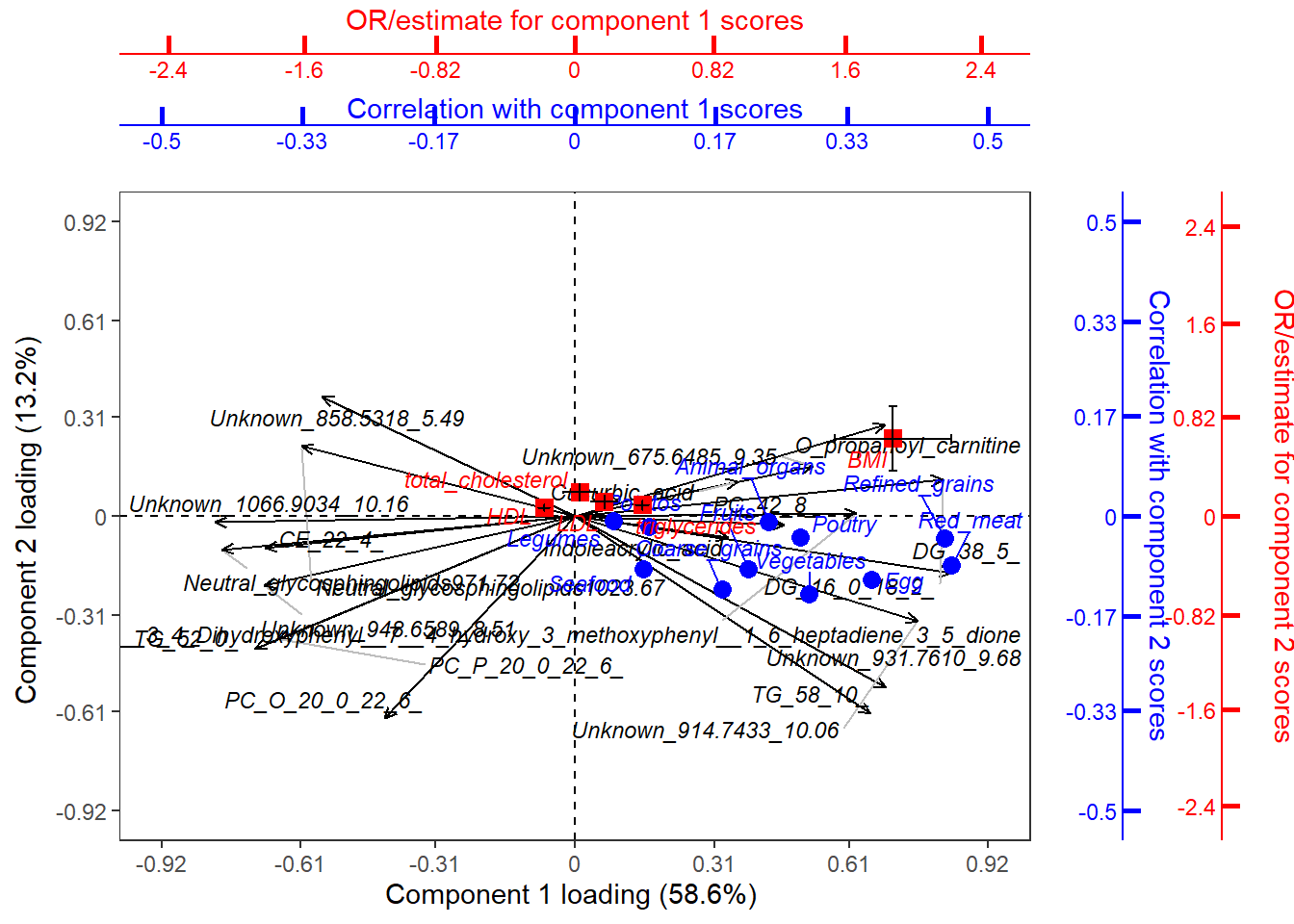
In the triplot, black arrows represent loadings of Omics variables, forming patterns in different components (axes). Blue circle points show exposure correlations with the components, while red square points indicate outcome associations with the components.
For interpretation, let’s focus on Principal Component 1 (PC1) and Principal Component 2 (PC2), using the exposures "Refined grains", "Red meat", and the outcome "BMI" as examples:
PC1: This component shows a positive association with BMI and is correlated with high intakes of red meat and refined grains, even after adjusting for age and sex. This suggests that the metabolite features dominating PC1 may provide valuable insights into how the intake of red meat and refined grains could influence BMI.
PC2: In contrast, PC2 exhibits a smaller association with BMI and a weak inverse correlation with red meat and refined grains. The metabolite features contributing significantly to PC2 may indicate a marginal beneficial effect of these dietary components, although this effect appears to be limited. This may also suggest that the features dominating PC2 may reflect metabolite patterns influenced by food, but not to a large degree associations with metabolic regulation in relation to health.
This interpretation highlights how different dietary exposures relate to metabolic outcomes, offering insights into potential mechanisms at play.
Step 5: Mediation analysis and visualization
Mediation analysis will be performed using the conventional(Baron-Kenny) method on our selected exposures ("Refined grains", "Red meat"), and the outcome of interest ("BMI"), using components generated from Step 1 as mediators and adjusting for age and sex in both the exposure-mediator and mediator-outcome associations.
Show the code
mediation_object3 <-
  getMediationConventional (mediator = TPObject3$scores[,c(1:2),drop = FALSE],
                             # Specfiying at least 2 components so that there can be a 2-dimensional plot
                             exposure = exposure1[,c("Refined_grains","Red_meat"),drop = FALSE],
                             outcome = outcome1[,"BMI",drop = FALSE],
                             confounderME = covariates1,
                             confounderOE = covariates1)
After mediation analysis is performed, users can select which exposure, mediator and outcome variables to use for mediation barplot visualization. Users can examine the barplot for a clearer view of the direct, indirect, and total effects for each combination of PC, exposure, and outcome.
Show the code
mediation_plots3 <- mediationBarplot(mediationObject = mediation_object3,
                                         cex = 2,
                                         # size of the text
                                         by_row = "one_column")
Show the code
mediation_plots3plot
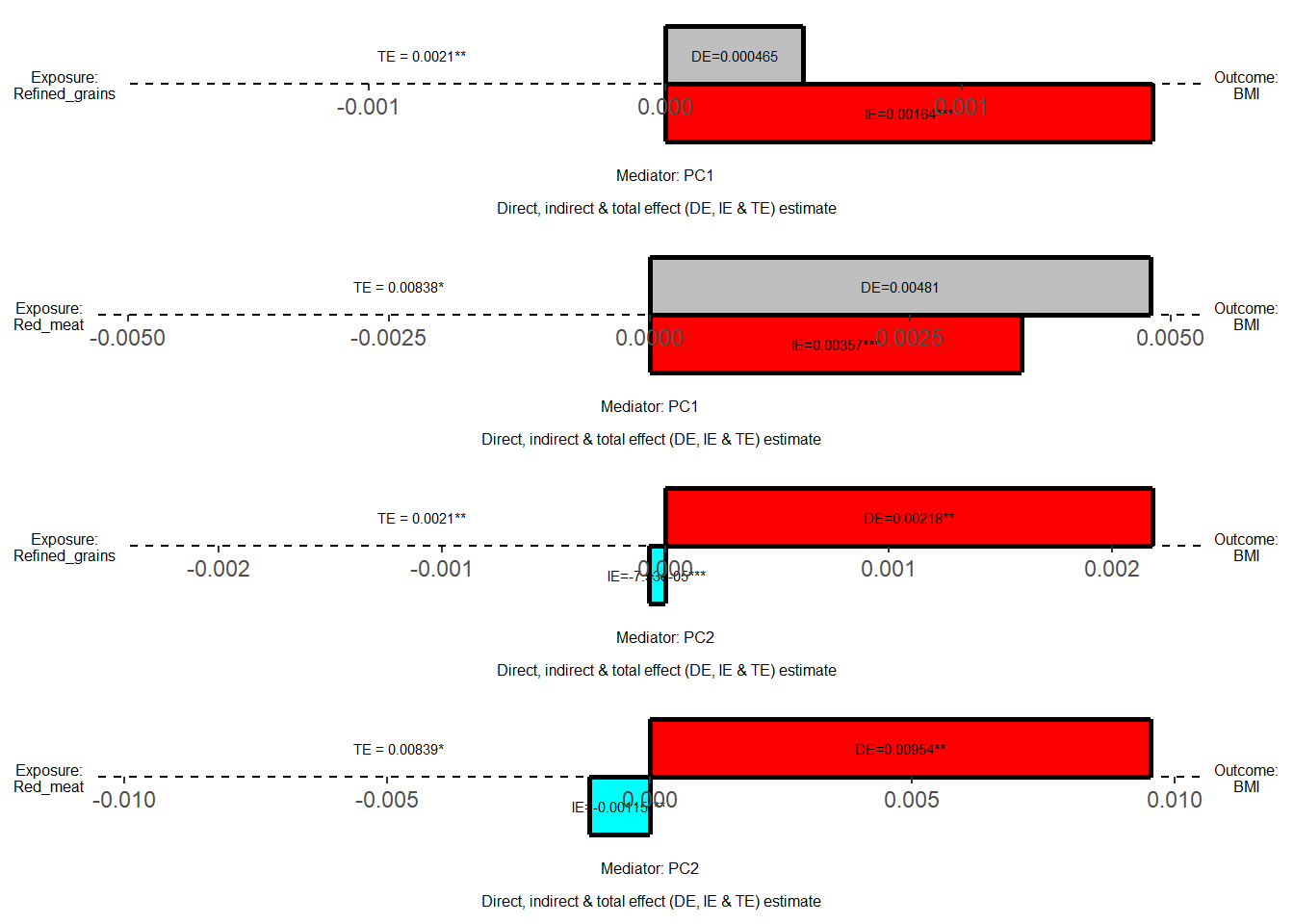
The barplot displays direct, indirect, and total effects for each exposure-mediator-outcome combination, providing a convenient tool to assess the direction and magnitude of mediation estimates.
- Color coding indicates significance and direction: red represents significant positive effects (p<0.05), blue represents significant negative effects (p<0.05), and grey represents insignificant effects.
- Significance levels are denoted by stars: one star for p<0.05, two stars for p<0.01, and three stars for p<0.001.
The mediation results are then added to the TPObject.
Show the code
TPObject4 <- addMediation(TPObject = TPObject3,
                           mediationObject = mediation_object3)
Adding mediation to TPO
-------------------------

TPO mediation has used 2 mediators, 2 exposures, 1 outcomes
Mediators are PC1, PC2
Exposures are Refined_grains, Red_meat
Outcomes are BMI
Based on the mediation barplot, we observed significant mediation effects through PC1 for the red_meat-BMI and refined_grain-BMI associations. This finding suggests that the metabolite features contributing to PC1 are likely mediating the pathway from red meat and refined grain intake to BMI changes. These results provide insight into potential metabolic mechanisms linking dietary patterns to body mass index.
Comparative Visualization
Users can easily visualize the exposure associations, risk estimations, and mediation results stored in the TPObject using the checkTPO() function provided by TriplotGUI. This function generates heatmaps for each type of analysis, offering a comprehensive and intuitive way to examine the relationships between variables. Note that you could put any TPObjects generate along the steps for heatmap visualizations.
Show the code
checkTPObject4 <- checkTPO(TPObject4,
                           mediators=c("PC1","PC2"),
                                  size=7    ## customize the size of stars
                                  )
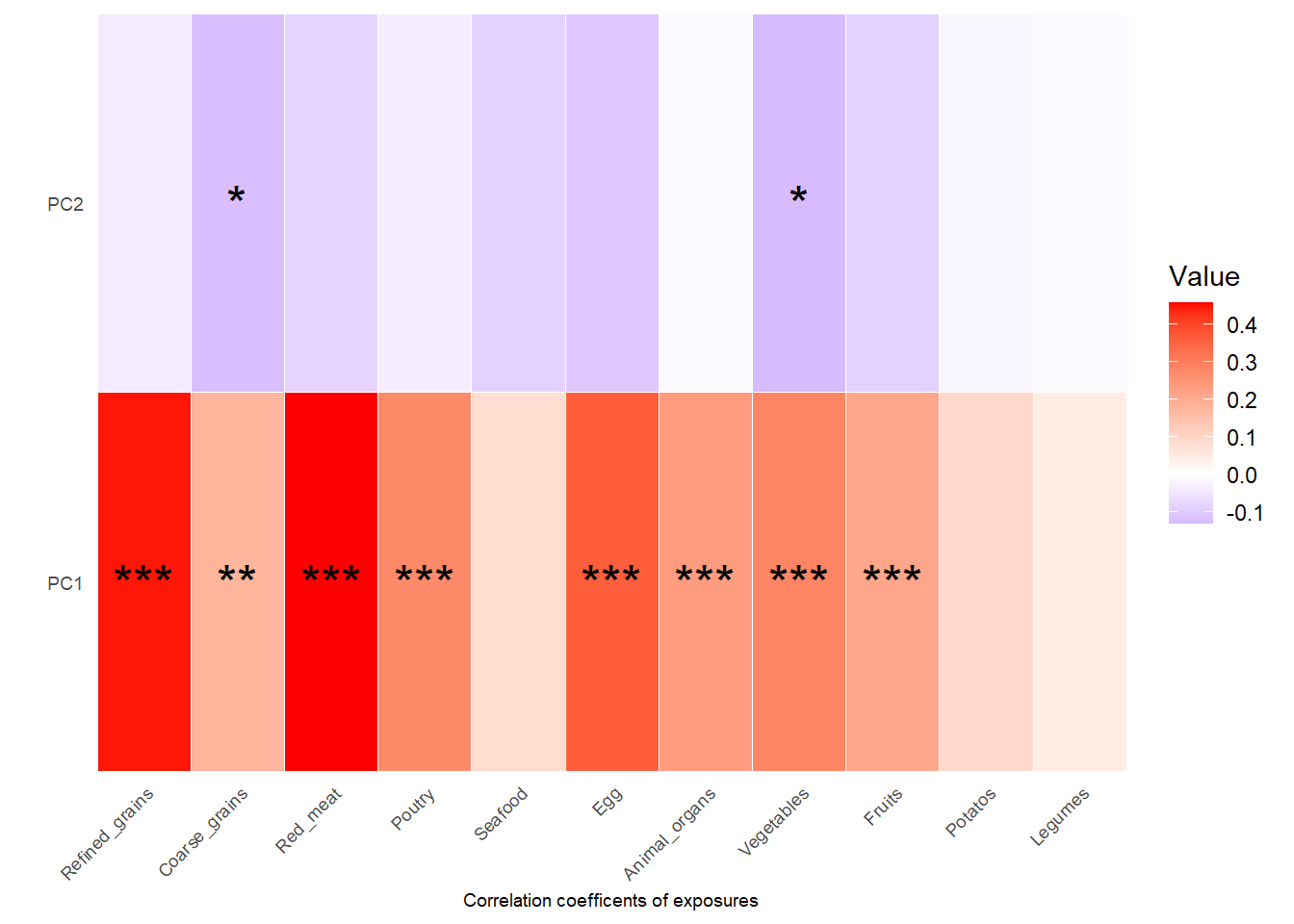
Show heatmap for correlation coefficients and p values between PCs and exposures:
Show the code
checkTPObject4$corr_coefficientsplot
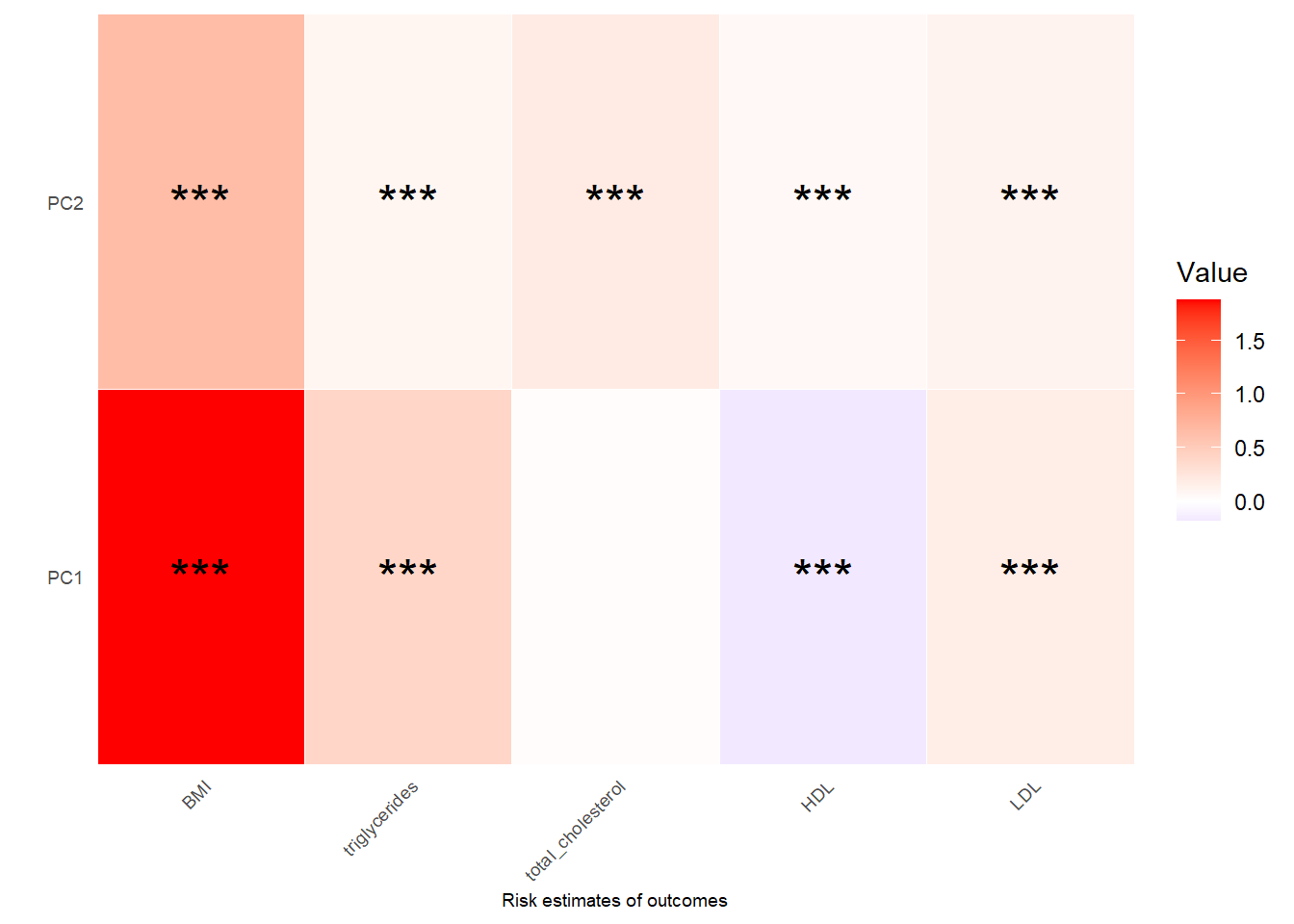
Show heatmap for risk estimates (beta coefficients) and p values between PCs and outcomes:
Show the code
checkTPObject4$risk_coefficientsplot
Show heatmap for mediation estimates and p values for indirect effect(IE), and total effect(TE), proportion mediated (PM) and adjusted proportion mediated (APM): See Manual section for more details:
Show the code
checkTPObject4$med_coefficientsplot
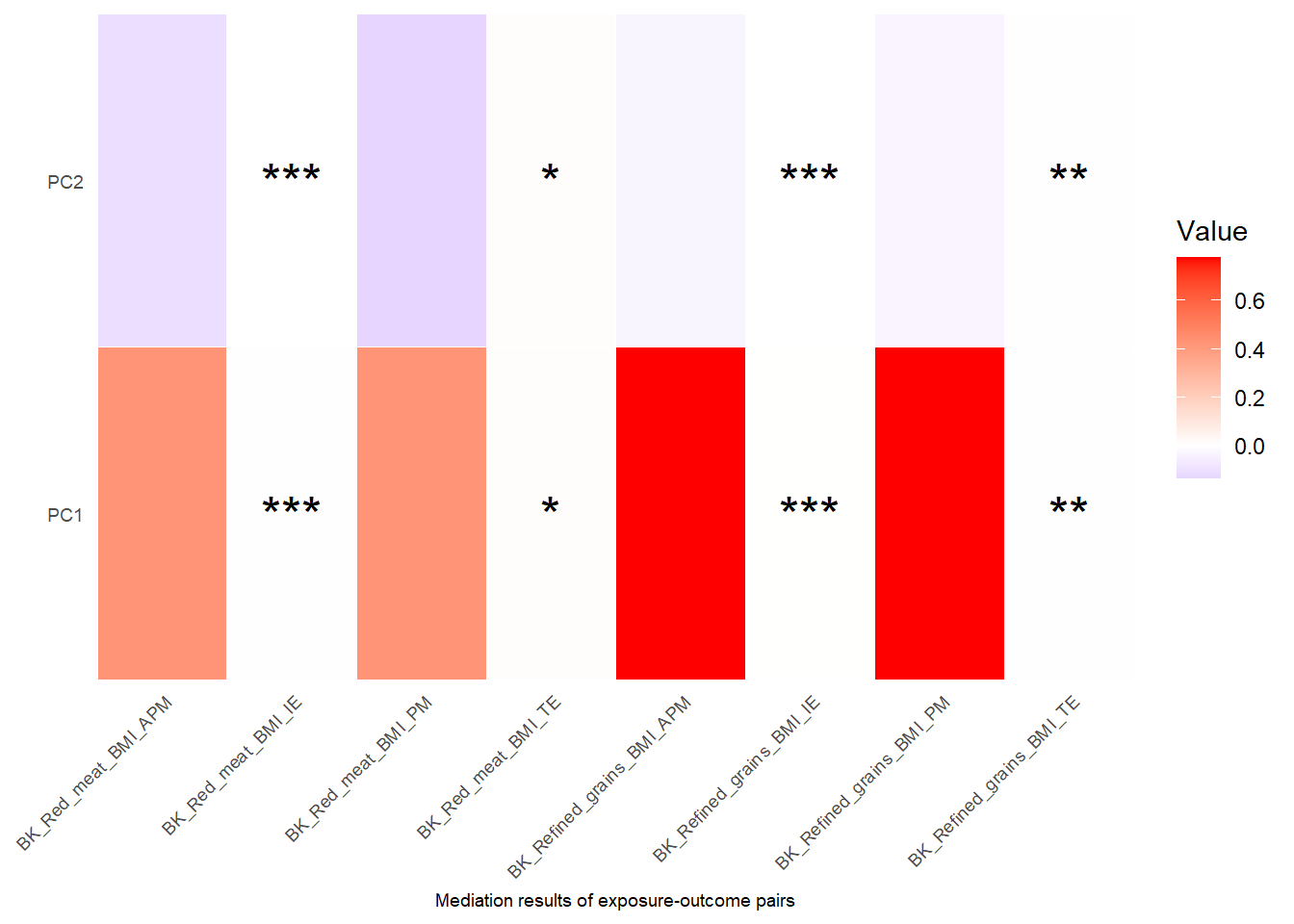
- Significance is indicated as follows. One star for p<0.05; Two stars for p<0.01; Three stars for p<0.001.
- Note that in the heatmap from
checkTPbject4$med_coefficients, only the selected exposures, mediators and outcomes that we use to do mediation on will show up. The rows in the heatmaps are mediators and the column represents exposure-outcome pairs. For each exposure-outcome pair, 4 result are shown: IE (indirect effect), TE (total effect), PM(Proportion Mediated) and APM(Adjusted Proportion Mediated). Please see Details section for more information. The “BK” before the names of exposures-outcome pairs means that this mediation is using the Coventional Baron-Kenny “product” method. For this method, only the significant level of IE and TE is calculated and shown on the plot, but not PM and APM.
Data Download
To save all your output, including data, results, and visualization output as an .rda file, you can use the save() function in R.
Show the code
save(exposure1,Omics1,outcome1,covariates1,
     reduced_Omics1,Correlations_object,Risks_object,
     mediation_object3,mediation_plots3,
     TPObject1,TPObject2,TPObject3,TPObject4,
     checkTPObject4,
     "Tutorial_simple_output.rda")